제품 개요
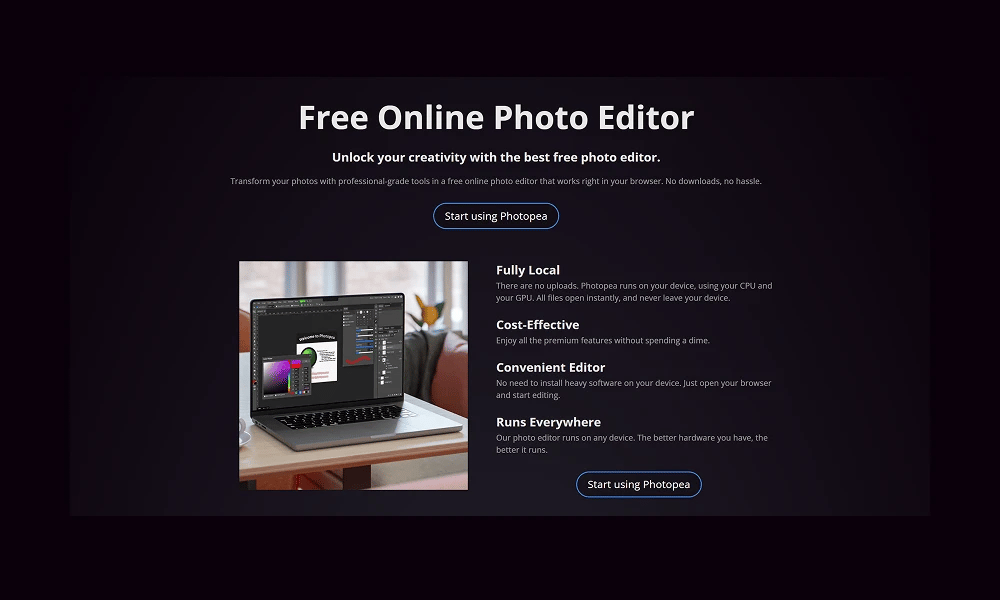
Photopea is an incredibly powerful and completely free advanced online image editor. It requires no installation, runs entirely in your web browser, and is famous for closely mirroring the interface, features, and workflow of Adobe Photoshop. Free & Accessible in the Browser: This is Photopea's primary appeal. You can use it instantly on any computer with a browser (Windows, Mac, Linux, Chromebook) without any downloads or payments. It's ad-supported and free for all users. Incredible File Compatibility: This is its killer feature. Photopea doesn't just handle standard image formats (JPG, PNG, GIF); it can seamlessly open, edit, and save source files from professional design software, including .PSD (Photoshop), .XCF (GIMP), .sketch (Sketch), and .XD (Adobe XD). Familiar UI & Professional Features: For anyone who has ever used Photoshop, the learning curve for Photopea is virtually zero. It provides a full suite of professional-grade features like layers, masks, smart objects, adjustment layers, filters, and path tools, making it more than capable of handling complex editing tasks. Photopea is a true digital Swiss Army knife and an absolute lifesaver for designers, developers, and anyone in need of powerful image manipulation on the fly. Whether you need to quickly edit a PSD file without having Photoshop installed or are looking for a zero-cost, professional-grade photo editor, Photopea offers an unbelievably powerful solution.
추천 대상
Photopea는 true digital Swiss Army knife 및 absolute lifesaver 를 위한 디자이너, 개발자, 및 anyone 에서 필요 의 강력한 이미지 manipulation 에서 fly. Whether 당신 필요 로 빠르게 편집 PSD file 없이 having Photoshop installed 또는는 looking 를 위한 zero-cost, 전문가용 사진 editor, Photopea 제공합니다 unbelievably 강력한 솔루션.
주요 기능
- 무료 & Accessible 에서 브라우저: 이 is Photopea's primary appeal. 당신 할 수 있다 사용 그것 instantly 에서 어떤 computer 를 사용한 브라우저 (Windows, Mac, Linux, Chromebook) 없이 어떤 다운로드 또는 payments. 그것's 광고-지원됨 및 무료 를 위한 모든 사용자.
- Incredible File Compatibility: 이 is 그것의 killer feature. Photopea doesn't 그냥 handle 표준 이미지 formats (JPG, PNG, GIF); 그것 할 수 있다 seamlessly 열기, 편집, 및 저장 source files 에서 전문가 디자인 소프트웨어, 포함 .PSD (Photoshop), .XCF (GIMP), .Sketch (Sketch), 및 .XD (Adobe XD).
- Familiar UI & 전문가 기능: 를 위한 anyone 누가 가지다 지금까지 used Photoshop, learning curve 를 위한 Photopea is virtually zero. 그것 제공합니다 전체 스위트 의 전문가용 기능 같은 레이어, masks, 스마트 objects, adjustment 레이어, 필터, 및 path 도구, 만드는 중 그것 더 than capable 의 handling complex 편집 tasks.
장점
- +무료 사용 가능
- +풍부한 미디어 라이브러리
- +워크플로우 간소화
- +개발자 친화적
단점
- -학습 곡선이 있을 수 있음
- -무료 플랜은 기능 제한
/// 스펙
- 가격:ProFree
- Free tier available, premium features paid
Adobe Firefly
Commercially 안전한 AI 를 위한 크리에이티브 Workflows
Looka
당신의 AI 기반 브랜딩 Partner
Lottie Creator
Official 애니메이션 도구 에서 LottieFiles
Lottielab
온라인 애니메이션 Editor 구축된 를 위한 Lottie
Proto.io
Ultra High-Fidelity 프로토타이핑 플랫폼 를 위한 모바일

Microsoft Designer
AI 기반 디자인하다 App
Cavalry
Procedural Powerhouse 를 위한 모션 디자인

Gamma
Future 의 Presentations, Powered 에 의한 AI
Rive
실시간 인터랙티브 애니메이션 플랫폼
Uizard
AI 기반 UI 디자인 도구 를 위한 Rapid 프로토타이핑