Product Overview
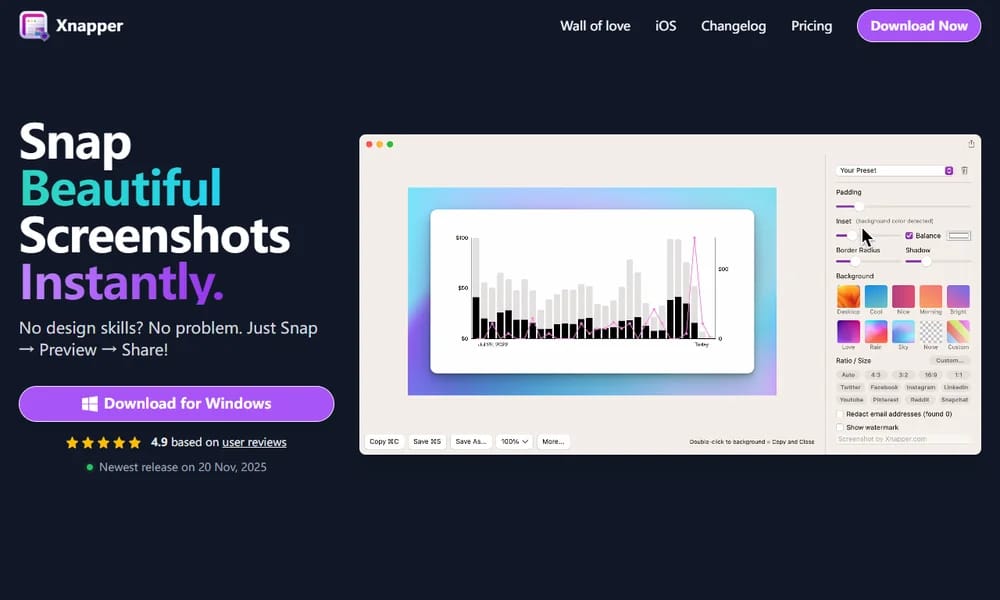
Xnapper is a macOS-native screenshot tool that goes beyond basic capture to help you create polished, presentation-ready screenshots. It automatically adds drop shadows, rounded corners, and background fills, and can blur sensitive information with one click. You can annotate with arrows, text, and shapes, arrange multiple shots into a single image, and share directly via various platforms. It integrates tightly with macOS gestures and shortcuts for a seamless workflow.
Best For
Mac users who frequently share screenshots and want to present them in a clean, professional style without manual editing.
Key Features
- Capture and beautify screenshots with auto shadows, rounded corners, and backgrounds
- One-click blur to hide sensitive or private information in screenshots
- Annotation tools including arrows, text, shapes, and highlights
- Combine multiple screenshots into a single image for comparison
- Direct sharing to popular platforms and clipboard integration
Pros
- +Turns ordinary screenshots into polished, professional-looking images instantly
- +Clean and intuitive interface designed specifically for macOS
- +Smart auto-blur feature saves time when redacting sensitive content
Cons
- -Available exclusively on macOS with no Windows or Linux version
- -Advanced features like custom templates require the paid Pro plan
/// SPECS
- Pricing:ProFree
- Platform:Mac

Relight
AI-powered image relighting — adjust light direction, intensity, and color

Animista
Ready-to-use CSS animations library with customizable effects

NVIDIA Canvas
Turn simple brush strokes into realistic landscape images

App Icon Generator
Generate all required app icon sizes from one image
Draw.io / diagrams.net
Free open-source diagramming for everyone

Squircley
Generate beautiful SVG squircles with organic curves

MagicPattern
Create stunning patterns, gradients, and blobs in minutes

CSS Scan
Inspect and copy CSS of any element on any website

DiffusionBee
Free Stable Diffusion AI image generator for Mac

Bento
Build a beautiful personal bio page in minutes