Product Overview
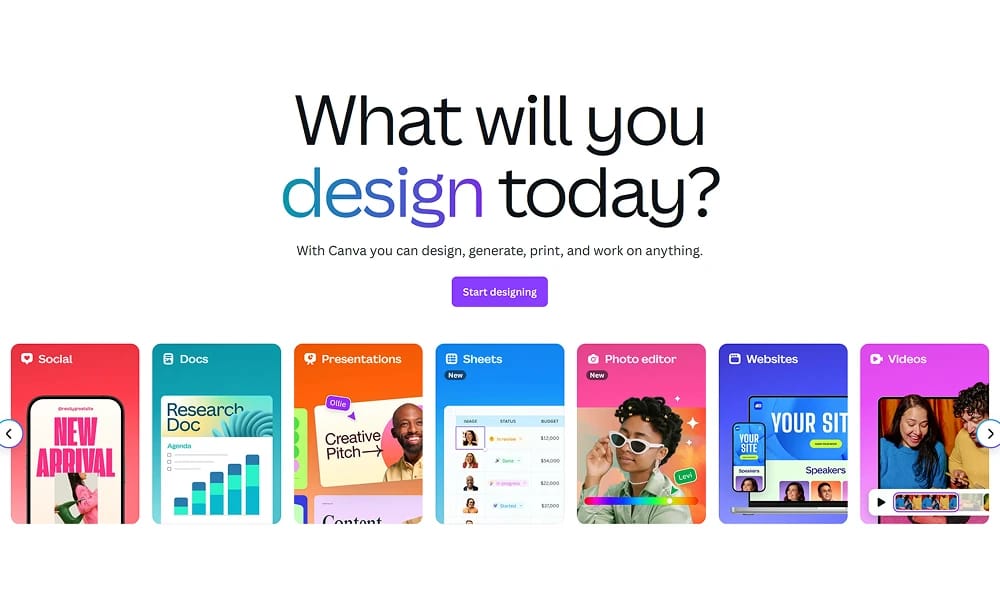
Canva is an incredibly easy-to-use online graphic design platform that empowers anyone, regardless of their design experience, to create professional-quality social media graphics, presentations, posters, and more using a simple drag-and-drop interface. Massive Library of Templates & Assets: This is the heart of Canva. It includes millions of beautifully designed templates for every imaginable scenario (holiday posts, business reports, resumes, menus, etc.). Users can simply pick a template, replace the text and images, and have a finished design in minutes. Simple Drag-and-Drop Interface: Canva's interface is highly intuitive, with a near-zero learning curve. All actions are based on dragging, dropping, and clicking, eliminating the need to understand complex design concepts like layers or paths, making design feel as easy and fun as building with blocks. All-in-One Visual Communication Suite: It has evolved far beyond simple image creation. Today, you can use Canva to create videos, build websites, design brand kits, and collaborate with team members in real-time with comments and approvals, making it a comprehensive hub for visual communication. Canva has successfully democratized design, putting creative power into the hands of millions. It’s not designed to replace professional designers, but rather to empower the marketers, small business owners, students, and content creators who need to produce beautiful visuals quickly. It is the ultimate tool for anyone who needs to design something fast and have it look great.
Best For
Canva has successfully democratized design, putting creative power into the hands of millions. It’s not designed to replace professional designers, but rather to empower the marketers, small business owners, students, and content creators who need to produce beautiful visuals quickly. It is the ultimate tool for anyone who needs to design something fast and have it look great.
Key Features
- Massive Library of Templates & Assets: This is the heart of Canva. It includes millions of beautifully designed templates for every imaginable scenario (holiday posts, business reports, resumes, menus, etc.). Users can simply pick a template, replace the text and images, and have a finished design in minutes.
- Simple Drag-and-Drop Interface: Canva's interface is highly intuitive, with a near-zero learning curve. All actions are based on dragging, dropping, and clicking, eliminating the need to understand complex design concepts like layers or paths, making design feel as easy and fun as building with blocks.
- All-in-One Visual Communication Suite: It has evolved far beyond simple image creation. Today, you can use Canva to create videos, build websites, design brand kits, and collaborate with team members in real-time with comments and approvals, making it a comprehensive hub for visual communication.
Pros
- +Real-time collaboration
- +Ready-to-use templates
- +Content creation tools
- +Video editing capabilities
Cons
- -May have a learning curve
- -Free tier has limited functionality
/// SPECS
- Pricing:ProFree
- Free tier available, premium features paid
Vectary
The Online 3D and AR Platform for Designers

Jitter
The Simple Motion Design Tool
Affinity Photo
The Professional, No-Subscription Photo Editor

CorelDRAW
The Time-Honored Professional Graphics Suite

Cinema 4d
The 3D Powerhouse for Motion Graphics

Spline
The Easy Way to Create 3D for the Web

Krita
The Professional Open-Source Painting Studio for Artists
Blender
The Open-Source 3D Creation Suite
Affinity Designer
Where Vector Meets Raster

Womp
The Goopy 3D Modeling Platform for Everyone