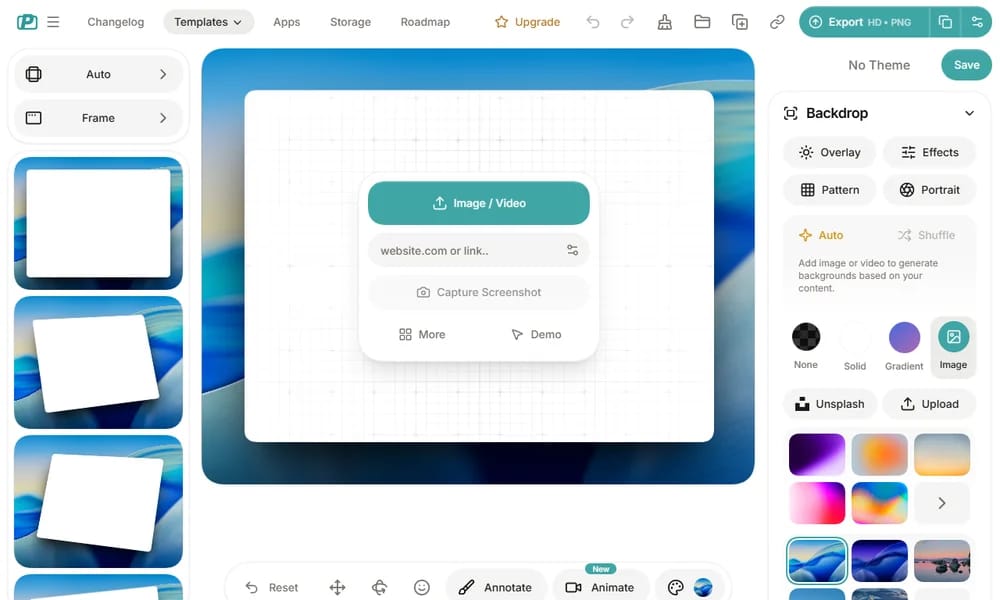
Product Overview
PostSpark is an online tool for beautifying screenshots and images by adding stylish borders, shadows, device mockups, and gradient backgrounds. It transforms plain screenshots into polished, presentation-ready visuals perfect for social media, portfolios, documentation, and marketing materials. With a simple drag-and-drop interface, you can enhance images in seconds and export them in high resolution.
Best For
Content creators, marketers, and designers who need to quickly turn plain screenshots into polished, professional visuals
Key Features
- Add customizable borders and shadows to screenshots and images
- Device mockup frames including phones, tablets, and laptops
- Gradient and solid color background options for image presentation
- Resize and crop tools for perfect image framing
- High-resolution export suitable for print and web use
- Batch processing for consistent styling across multiple images
Pros
- +Quick and easy image enhancement process
- +Professional-looking results with minimal effort
- +Wide variety of mockup and styling options
Cons
- -Limited advanced photo editing features
- -Some features require premium subscription
/// SPECS
- Pricing:ProFree
- Platform:Web

EditorX
Professional drag-and-drop website builder for designers

Simple.ink
Beautiful design documentation and handoff platform

Qingtu
Screenshot beautification, annotation and sharing tool

Same.energy
AI-powered visual search for similar style and composition

VectorWiki
Search engine for thousands of free SVG vector icons

ClipDrop Image Upscaler
AI-powered image upscaling up to 4x resolution

Macaron
Free collection of SVG UI elements and design assets

Screensiz.es
Comprehensive reference for device screen sizes and resolutions

Checklist Design
Curated checklists for every stage of design
Imgsrc.io
Brand mockup generator for social-ready images