Sketch
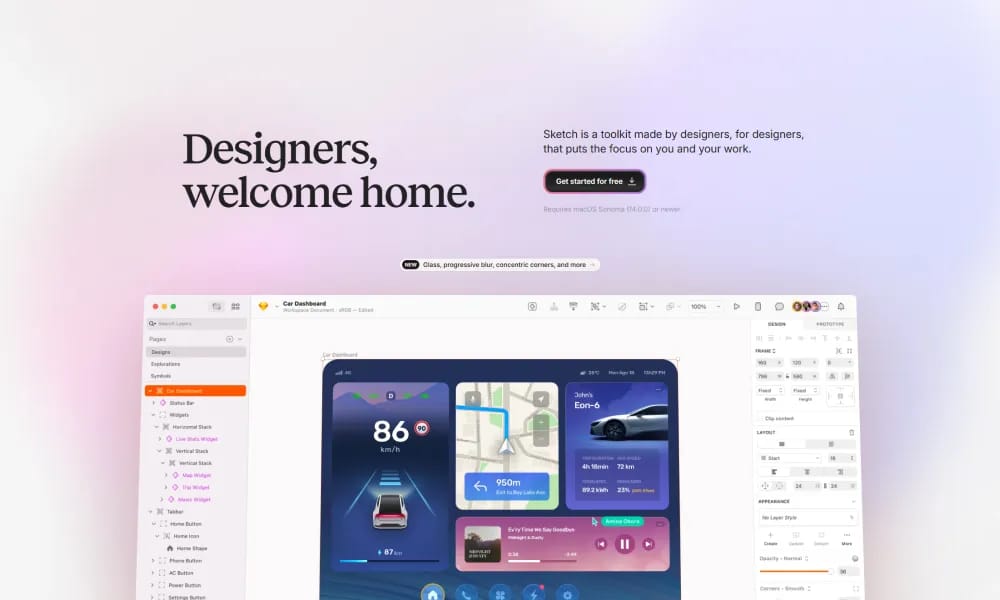
Sketch is a toolkit made by designers, for designers, that puts the focus on you and your work.
Product Overview
Sketch: The Efficient UI/UX Design Tool Sketch is a vector drawing application built for digital product design, running exclusively on the macOS platform. With its clean interface, efficient workflow, and powerful features, it has become an essential tool for numerous UI/UX designers worldwide. Component-Based Design (Symbols): This is at the heart of Sketch. You can create reusable components, making it easy to build and maintain consistent, efficient design systems. Edit once, and the changes sync everywhere. Robust Plugin Ecosystem: With a vast and mature library of plugins, you can extend Sketch's capabilities infinitely. Whether for data filling, animation prototyping, or code exporting, plugins allow you to customize your workflow. Native App Performance: As a native macOS application, Sketch runs smoothly and is highly responsive. It fully supports offline work, allowing you to create anytime, anywhere. Collaboration and Handoff: With Sketch Cloud, teams can easily share designs and receive feedback through online comments. It also provides developers with tools to inspect specs and download assets, streamlining the design-to-development workflow. Sketch focuses on providing designers with a stable, professional, and efficient creative environment. If you're a macOS user seeking top-tier performance and a mature design workflow, Sketch remains an ideal choice for building high-quality digital products.
Best For
Sketch focuses on providing designers with a stable, professional, and efficient creative environment. If you're a macOS user seeking top-tier performance and a mature design workflow, Sketch remains an ideal choice for building high-quality digital products.
Key Features
- Component-Based Design (Symbols): This is at the heart of Sketch. You can create reusable components, making it easy to build and maintain consistent, efficient design systems. Edit once, and the changes sync everywhere.
- Robust Plugin Ecosystem: With a vast and mature library of plugins, you can extend Sketch's capabilities infinitely. Whether for data filling, animation prototyping, or code exporting, plugins allow you to customize your workflow.
- Native App Performance: As a native macOS application, Sketch runs smoothly and is highly responsive. It fully supports offline work, allowing you to create anytime, anywhere.
- Collaboration and Handoff: With Sketch Cloud, teams can easily share designs and receive feedback through online comments. It also provides developers with tools to inspect specs and download assets, streamlining the design-to-development workflow.
Pros
- +Real-time collaboration
- +Cloud-based, no installation needed
- +Smooth animation capabilities
- +Code-exportable animations
Cons
- -May require design experience
- -Advanced interactions need coding
/// SPECS
- Pricing:ProFree
- Free tier available, premium features paid